
Milwin Support offers new contact entry points and help information to the platform’s Message Center. On the page you’ll see the Support, News, Notice and Marquee tabs, along with support-related controls and a searchable Help Center.
The appropriate beginning point depends on the question. A basic explanation may be found in a help entry; an account-specific record requires the applicable support path for the provider. An answer about a single account is a different sort of information from an announcement.
This page describes those areas and the checks to make before releasing private details. For the wider interface, consult the Milwin handbook. Milwins provides information and does not provide the account support service of the platform.
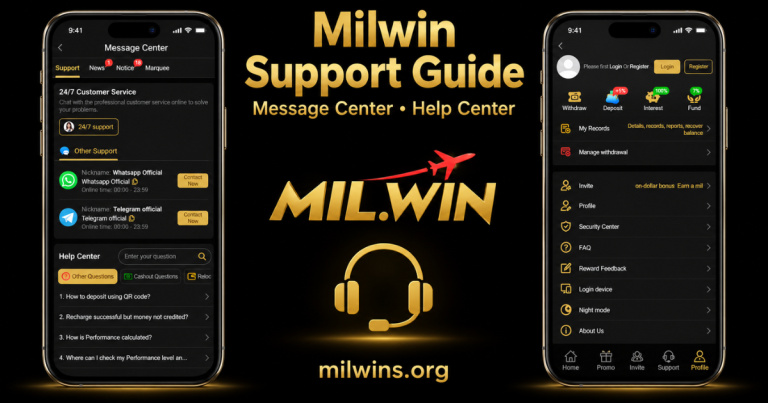
Where the Support Entry is Shown
At the bottom, there is navigation with items Home, Promo, Invite, Profile and Support. There’s also a Support shortcut in the More menu on the home screen.
There is a separate FAQ entry under the Profile menu. These labels are useful in determining multiple paths to aid or information; they are not necessarily on the same page.
Open an entry and read the destination heading. The visible assistance page is called Message Center, with assistance selected in its top menu.
A Map of the Message Center
| Visible section | What to inspect | What the label alone does not establish |
|---|---|---|
| Support | Contact entry points and help content | That a representative is currently responding |
| News | The content, date and scope of a news item | That it is a personal account reply |
| Notice | The wording and applicable period of a notice | That an older item explains today’s issue |
| Marquee | The message shown inside that section | That it confirms an individual record |
| Help Center | Search results and question entries | That a general answer resolves every account case |
The upper menu shows small badges beside some tabs. Read the actual items before interpreting a number as an unanswered ticket count or a completed support response.
What the Customer Service Labels Create
The Support page contains 24/7 Customer Service and a 24/7 support control. These are service labels on the part of the platform, not an independently confirmed promise of response time.
An offered path is determined by a contact control. It does not guarantee how quickly you will get a response , if the route is accessible in all regions , or if it can resolve a specific record .
Follow the destination where it is opened. If specifics are not given, don’t assume the label provides a live chat interface, a callback service or a specific issue process.
Other Support: WhatsApp & Telegram Tags
There is an Other Support section, featuring WhatsApp and Telegram listings, each with a Contact Now button. The names are with Official language and an online time field.
Think of those names as information provided by the platform. The term Official does not imply independent verification that an external account is owned by the operator.
Before using the external contact line:
- Check the destination: Read the account identifier or address actually opened, rather than relying only on its picture or display name.
- Compare the route: Use the entry presented by the platform instead of assuming an unrelated social profile is equivalent.
- Review the request: Understand why the contact is asking for a particular detail before sending it.
- Keep account secrets private: Do not provide passwords or sign-in verification codes in a conversation.
The visible support page does not establish a confirmed phone number or username for this guide to publish. A contact name should not be turned into an invented address.
Use Milwin Help Center
The Help Center has a search section entitled Enter your question and a search icon underneath the contact area. The categories that are visible are Other Questions and Cashout Questions.
First, find words closest to the problem. A concise explanation like login, record or withdrawal is easier to compare with outcomes than a large message comprising multiple unconnected difficulties.
Read the title of the returned question and its answer if any. A matched heading is a beginning point and not proof that the answer applies to all account states.
Do not type passwords, codes or entire payment references into a general help search. The aim is to collect information, not evidence, that private account data is required.
Read the Answer Before Interpreting the Question
The viewable help list has headings about usage of a QR code for deposit, recharge not showing as credited and calculation of Performance. Headings are only names of topics, they don’t address the issues.
A title like Recharge succeeds but money not credited? does not indicate that there is currently a payment outage on the platform. It indicates that issue is present in help list.
Likewise, Performance is a platform term in the inquiry header. It has a meaning and computation that requires an appropriate explanation and not an assumption about device performance, game results or award eligibility.
Open the correct entry and read the entire answer. If a crucial condition is not obvious, contact provider assistance to clarify that condition.
Choose a Route Based on the Issue
| Question or symptom | Useful starting point | Relevant guide |
|---|---|---|
| The page or help panel will not load | Identify the affected screen and error | Troubleshooting |
| Login opens but account access fails | Read the form’s exact response | Login guide |
| Download or installation is unclear | Identify the offered access method | Download guide |
| A Profile or device-related control is unclear | Read the destination and confirmation | Profile and Security |
| A VIP or rebate figure needs explanation | Identify the level, provider row and record stage | VIP and Rebate |
| An individual account record needs review | Use the provider’s relevant support route | Keep reference details private |
These guides explain navigation and checks. They do not inspect provider accounts or replace a response about an individual case.
Delivering a Clear Support Report
One issue at a time. A good report. Tell me what you opened up, what you anticipated to find and what you really saw.
For example, “The support panel opens, but selecting a Help Center entry leaves the page blank” is a specific issue with navigation. Saying “the whole app is broken” doesn’t have the same level of depth.
Include when appropriate:
- The section, title or record type involved.
- The exact error wording, if one is displayed.
- The time of the issue and your time zone.
- The device and browser, or an app version if the device displays it.
- Any checks already tried and whether they changed the result.
Do not guess a version number or a cause. A precise description is more useful than an unsupported explanation such as maintenance, a payment-gateway failure or an account restriction.
If the Question is About a Pending Record
Decouple a generic loading problem from the status and reference information of the record. Just because a page opens correctly, does not mean that a deposit, withdrawal or other request has been accomplished.
If the outcome of the current record is uncertain, ask the provider to look at it. Don’t think repeating the action or making another payment will fix it.
The support query concerning money not being credited does not provide a processing timeline, a refund promise or that funds are secure. Such allegations demand a suitable response or rule.
Maintain a secret copy of the information required to identify the case. Do not put payment references or account numbers in public comments.
News, Notice and When the Data Was Updated
When reviewing an announcement, read its date, title and scope. The update may be confined to one supplier, one feature, or one period of time rather than the full platform.
An old announcement is no proof of continuing availability. A news item should not be considered as a personal answer unless the contents of that news item truly respond to that account case.
If an announcement looks to be relevant, compare its wording to the condition described. Do not turn a general headline into a statement about a specific account or record.
Uploading a Photo Without Revealing Account Details
Before you submit an image, look at the whole frame Passwords, verification codes, contact details, account identifiers, balances and transaction references. Share only what is necessary for the question.
That is a general navigation difficulty that may be explained by the menu and error message alone. A request related to an account may require more information through a proper private channel, but that does not make the same information OK to share publicly.
Contacting This Informational Website
Milwins.org publishes guides about the interface. It cannot reset a platform password, inspect a provider account, release a reward or approve a withdrawal.
For questions about this website’s content, use our Contact Us page. A content enquiry and an account-support request are different matters.
Do not send platform passwords or verification codes to this website. For provider account decisions, follow the platform’s relevant access and support instructions.
Frequently Asked Questions
Is the problem mentioned in a Help Center question happening now?
Nope. A help topic identifies a topic that the page describes. This doesn’t verify a continuing outage or issue for all users.
Does a on line time stamp mean immediate response?
No. The timetable shown does not constitute confirmation of availability or response time.
Can a social display name detect provider support?
No. Check the actual destination and account id. Familiar phrasing or artwork is not evidence of communication.
Does choosing Contact Now mean a case has been filed?
No, not by itself. Do not consider a request submitted until you have actually read the destination’s reply or confirmation.
Can this website tell if a support ticket been solved?
No. This site does not have access to provider ticket systems or account records. Follow the provider’s applicable path through the case.
Finding Information Without Mixing the Sections
The separation of help entries, announcements and individual account questions makes it easier to navigate Mil Win support. Begin with the portion that suits the problem and then read the real answer or response.
Check external destinations, keep relevant record facts private and do not assign cause not established A contact label or a generic help topic is a beginning point, not a promise of the outcome.