
Milwin Aviator is listed in the home library as a separate title. The plane design is red and the provider label is SPRIBE. That entry identifies the game being shown. It does not on its own provide the full rules, account limits or current availability.
A useful guide distinguishes between the general format of the title and the platform conditions. It also keeps a round result, account balance and withdrawal record separately. Because those are different stages.
On this page you will see the visible library entry, the general description of SPRIBE and the information to check when reading the rules of the game. To see the dashboard around it, check out our Milwin guide.
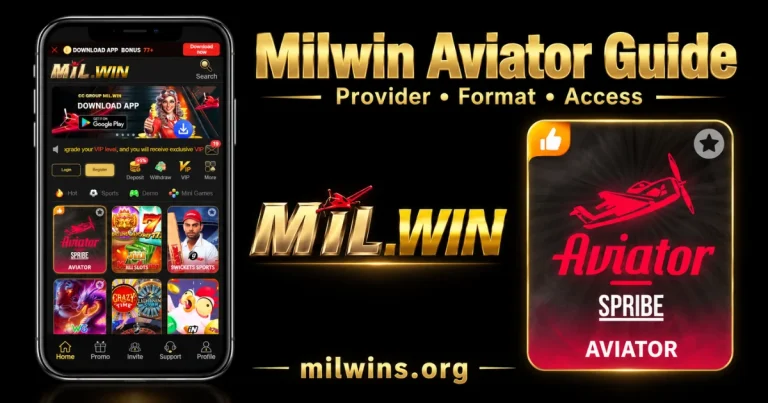
Discovering the Aviator in the Library
Aviator, as an example of a home library, falls into the Hot area. Its tile has the title and SPRIBE wording on it so it is easily distinguishable from the entries nearby and from provider collections.
A particular title is not the same as a collection tile. A title is one game. A collection can be used to choose from a number of items. Don’t just assume two tiles that look similar open the same content – read the label.
The Search option is in the surrounding interface. If you do use it to find a title, be sure the name and provider info returned matches the entry you were trying to find.
The category rows, provider labels, and browsing controls are explained in our Milwin games library guide. Check library order and available entries on the page being viewed.
The Provider, the Platform and This Website
These names have different roles:
| Name or label | Role in this guide |
|---|---|
| Aviator | The individual game title shown in the library |
| SPRIBE | The provider label on the tile and the developer describing the game on its own product page |
| Milwin | The platform interface through which the library entry is presented |
| milwins.org | This informational website, which publishes guides |
A provider label is useful for identifying a title. It is not independent proof of the operator’s identity, authorization or handling of an account.
Our website does not operate game rounds, inspect provider accounts or process withdrawals. Questions about an individual record need the relevant provider or platform support route.
The General Round Format
SPRIBE describes Aviator as a multiplayer game with a rising multiplier and a round that can end unexpectedly. Its overview explains that cash-out must occur before the round ends.
This describes the game’s general model. The displayed multiplier is part of an active round, not a promised return. Participation carries a risk of losing money, and the format should not be presented as a dependable income source.
Read the rules supplied with the actual game before interpreting a control or result. This guide does not establish Milwin-specific stake limits, maximum payouts or a particular control layout.
Cash-Out and Withdrawal Are Different Actions
The term cash-out in the game description relates to a round. Withdrawal concerns an account request to move funds through the platform’s available process.
A round result does not independently confirm that a withdrawal has been requested, approved or received. Those stages need their own records and conditions.
Similarly, a multiplier displayed during a round is not a completed account transaction. If an amount appears unclear, identify whether it belongs to the round display, game history, account balance or withdrawal record before reporting it.
What to Check in the Actual Game Rules
The library tile cannot answer every question. Look for the game’s own information or help area, where available, and read the applicable conditions.
- Title and provider: Confirm which game the rules describe, especially when a platform lists several plane-themed entries.
- Currency and amounts: Read the currency information and the limits displayed for that account. Do not copy a number from another operator.
- Round controls: Identify what a control does and when it is available. A label alone may not explain every condition.
- Interrupted connections: Check how the rules describe an interrupted session or an unclear response.
- Records: Find out where completed activity can be reviewed and which details identify a particular round.
- Account conditions: Read any relevant access, verification or withdrawal requirements separately from the game description.
If the explanation is missing or unclear, ask support. Do not replace the missing rule with an assumption based on another website’s layout.
Understanding the Published RTP Figure
SPRIBE’s product page lists an RTP of 97% for Aviator. That is the figure on the provider’s description; this guide does not independently verify the configuration of a Milwin-hosted instance.
RTP means return to player. It describes a long-term statistical figure, not an amount promised to an individual in a session. The UK Gambling Commission explains that RTP is an average over many plays and cannot be measured from one person’s play alone.
A listed percentage does not mean a reader will receive that percentage of a deposit back. It also does not specify a personal chance of success on the next round.
Use the actual game’s information when checking its published figure. A short session, a selected result or an image of someone else’s record is not enough to confirm the game’s long-term performance.
What Provably Fair Is Intended to Explain
SPRIBE describes a cryptographic verification system called Provably Fair. Its explanation refers to server and player seeds, hashes and a way to inspect information associated with completed rounds.
In plain language, a seed is an input used in the process, and a hash is a value calculated from data. The provider presents these details as a way to check round generation.
Verification and prediction are different questions. A completed-round check is not a promise that someone can forecast the next result. It also does not independently verify an operator’s account decisions or withdrawal processing.
Follow the documentation belonging to the actual title and version. This guide has not audited the implementation available through Milwin and does not treat a fairness label as proof that every aspect of the platform has been checked.
Social Features and Other Players’ Records
The provider describes in-game chat, live activity displays and statistics among Aviator’s social features. Their availability and layout need checking in the version actually opened.
Another person’s displayed activity is not a promise about your own result. Chat messages and selected records also do not establish a reliable method for predicting a round.
Keep account details out of public conversations. A person speaking in a game chat should not automatically be treated as verified support, even if they use a familiar name or logo.
A Demo Heading Does Not Identify Every Game Mode
The wider Milwin home navigation includes Demo. That heading does not establish that every library title currently opens in demo mode or that every account has the same access.
Read the mode information on the page you actually open. Do not infer whether real funds are involved from the artwork, a familiar game name or the presence of a Demo category elsewhere.
If the mode is unclear, obtain clarification before using an amount-entry control. A demonstration screen and a funded account session should not be treated as interchangeable.
Phone, Tablet and Computer Access
SPRIBE lists desktop, tablet and mobile as device categories for Aviator. This describes the provider’s product support, rather than confirming every Milwin access route or device configuration.
On a phone, check whether text, controls and information panels fit the screen. On a larger display, check window size and browser zoom before assuming a control is unavailable.
An Aviator library tile does not establish a separate Android APK, an iPhone store listing or a native computer installer. Our Milwin Download guide explains the installation distinctions, while the Milwin for PC guide covers browser and desktop access methods.
Do not infer minimum RAM, file size or a supported operating-system version from a game image. Those details need relevant package or service documentation.
If the Tile Opens but the Game Does Not Load
Identify where the problem begins. A working home page followed by an unavailable title is different from a browser that cannot open any page.
Record the title, provider label and exact error. Check whether the issue affects one item or the surrounding library as well. This helps describe the scope without declaring a complete outage.
For connection, browser and app checks, use our Milwin troubleshooting guide. If an account record or round response is unclear, preserve its details and ask the provider to review it.
Reinstalling an application cannot independently confirm a completed round or resolve an account record. Avoid making repeated submissions while their earlier outcome remains unclear.
Keep Promotions Separate from Game Rules
VIP labels, missions and rebate entries belong to separate platform sections. Their presence does not establish that Aviator activity qualifies under every offer or collection rate.
Read the relevant promotion’s conditions for the named title or provider. Do not apply a Sports rebate percentage to Aviator simply because both appear within the same platform.
Our Milwin VIP and Rebate guide explains the difference between level progress, estimated figures, collectable amounts and claimed records.
Frequently Asked Questions
Is Aviator a provider collection or an individual title?
The visible library entry identifies an individual title with a SPRIBE label. It should not be described as a collection of every game from that provider.
Does the red plane artwork prove the opened game is authentic?
No. Artwork is an identification clue, not independent verification of the source or software behind the page.
Does an old round result establish the next multiplier?
A history entry describes a recorded result. It is not evidence that a future multiplier can be reliably predicted.
Are limits necessarily identical across platforms?
Do not assume they are. Check the applicable game information, account conditions and limits shown by the platform being used.
Does a star on the library tile describe the game’s odds?
The icon alone does not establish odds or a probability. Read the relevant control information rather than assigning it a meaning the interface has not explained.
Reading Aviator with Clear Expectations
The Mil Win Aviator entry identifies a title and its displayed provider. Understanding it requires the general round description, the actual rules and the relevant account records to be read separately.
Keep a changing multiplier separate from a completed result, and keep that result separate from withdrawal processing. Neither a provider feature nor a displayed percentage guarantees a personal outcome.