
Milwin games are set up in rows, with individual titles and provider collections displayed all over the library. The headings clearly separate Sports, Mini Games, Slot, Cards, Fishing and Live, so it is easy to distinguish one section from the other.
It is contingent upon the type of tile you are looking at. The featured area is a named title, Aviator. WG SLOTS or JILI FISHING are collections. Thus different sized pictures can give different levels of the catalogue.
The guide describes the categories listed and their visible collections and the browsing tools around them . For a broader dashboard and account overview, see our Milwin platform guide.
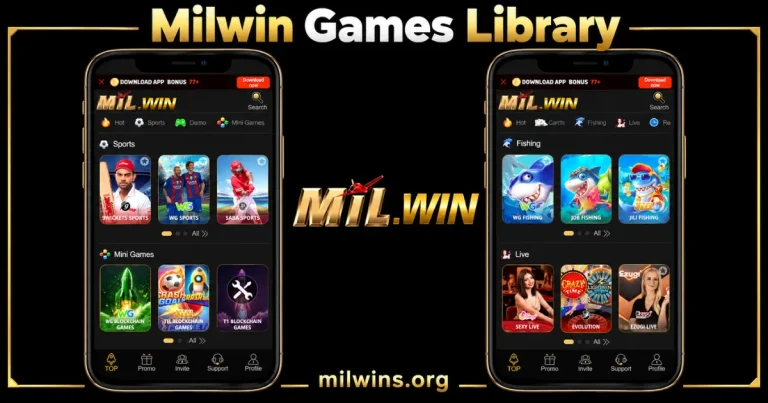
One Library, Two Styles of Tiles
A title tile identifies a specific game. A collection tile is a set of content under a label that identifies a provider or category. It’s more useful to read the text under a work of art than to judge the tile by its picture alone.
Cricket artwork may represent a sports collection rather than an individual scheduled match, for instance. A card illustration can identify a provider group without identifying card variations contained within it.
These differences also explain why a row of categories does not equal a complete list of titles. In the first view there is a set of entries and below several rows there are navigation dots and an All control.
Milwin Game Categories at a quick glance
The collections of the library reviewed are shown in the table below: it’s a map of the labels in sight, and not a promise that they’ll be around forever.
| Category | Listed collections | How to read the row |
|---|---|---|
| Sports | 9WICKETS SPORTS, WG SPORTS, SABA SPORTS | Sports-related collection entry points |
| Mini Games | WG BLOCKCHAIN GAMES, JILI BLOCKCHAIN GAMES, T1 BLOCKCHAIN GAMES | Separate mini-game collections |
| Slot | WG SLOTS, PG SLOTS, JDB SLOTS | Collections grouped under the Slot heading |
| Cards | WG CARDS, CARDRAGON SOFT, HB CARDS | Card-related provider collections |
| Fishing | WG FISHING, JDB FISHING, JILI FISHING | Fishing collections identified by their labels |
| Live | SEXY LIVE, EVOLUTION, EZUGI LIVE | Collections presented under Live |
The Mil Win games library uses the same row-based presentation in these sections. That consistency helps the reader to follow the catalogue even if the content inside each collection may vary.
Sports: Read the Collection in Advance of the Event
Sports has 3 visible collection tiles: 9WICKETS SPORTS, WG SPORTS and SABA SPORTS. The row is filled with cricket and football imagery, with the name of the collections below each tile.
They are names of the starting points of a collection linked to sports. They don’t display a fixture list, live event status or event specific rules. These details are supplied in the information included in the relevant collection.
When identifying an event, separate the event name and status from the art used on the main tile. An illustrated player is a visual cue, but not evidence that a specific match was listed at that time.
Mini Games: Same Artwork, Different Collections
The Mini Games row has WG BLOCKCHAIN GAMES, T1 BLOCKCHAIN GAMES and JILI BLOCKCHAIN GAMES. The art work has rocket and other illustrated motifs. One tile has a tools symbol.
The word blockchain is in the displayed collection label. It does not independently create a fairness audit, cryptocurrency requirement or particular payment method.
Check the information for one title before applying assumptions from another collection. A shared category heading does not imply that all entries share the same round structure, account conditions or controls.
Slot: Provider Labels Help Make Row Easier to Follow
In the Slot section, you will find WG SLOTS, PG SLOTS and JDB SLOTS. They all have different pictures but the provider-related wording is still easy to spot at the bottom.
This row puts entry points in collection order. It does not show the full list of titles in each group, and does not verify that a specific game referenced on another website is included.
If a guide refers to a named title, compare that name with title-level information instead of using a general illustration from a collection. The name of the collection differs from the name of the game.
Cards: Look at the name behind the picture
WG CARDS, CARDRAGON SOFT and HB CARDS are in the Cards row. Visually, the section is easily recognisable by cards, chips and other artwork, but the labels describe the entry points more accurately.
The heading is a category, not a statement that all familiar card formats are included. A guide should not add poker, rummy and other variations to the list of available games unless those titles are actually established.
Use the indicated title and its specific instructions to understand the content of any meeting. Other pieces of art don’t make the same rules.
Fishing: the same provider name can be found elsewhere
The Fishing row contains WG FISHING, JDB FISHING and JILI FISHING. They are separated from the card and sports rows by ocean-themed artwork.
Some provider prefixes show up in other categories as well. For example, WG is present in several labels of collections. So the category suffix helps tell the difference between a fishing entry and a slot/card entry.
This prevents all tiles with the same prefix from being treated as one interchangeable set. Please read the full label including the category if you are identifying an entry or describing it in a support question.
Live: A Different Category in the Same Layout
The live row includes EVOLUTION, SEXY LIVE and EZUGI LIVE. It does not have the images of the illustrated collection cards elsewhere, but its category header, tile layout and row controls are known.
The full set of sessions in them . The library view sets the collection labels . Availability, session details and any connection requirements should be checked at the appropriate entry.
An image with a host or studio-type presentation doesn’t guarantee streaming performance on all devices. Do not add quality claims or reliability claims with the collection description.
Search, Hot, and Demo: Three Different Browsing Labels
Near the top of the interface is the Search. This is the entry point of interest when looking for a name, but the reviewed library does not establish every supported filter or whether all collection names can be searched.
Hot is a featured tag for browsing Its position is not to be taken as a separately-verified ranking of popularity or as an evaluation of the games listed there.
Another option you can go for is Demo. The label itself doesn’t specify which titles have a demo mode or what the conditions are for it. Not all library entries have a demo, so make sure to read the information for the specific demo.
Recent and Favourites Alternative Ways to Get an Item
Recent and Favourites are in the More menu and the browsing controls. However, their labels do describe different routes: recently viewed content and saved selections.
Some tiles have a star icon on them. Check if a selection exists in Favourites and if account access is required where saving is supported. The material reviewed does not confirm that saved items are synchronised across devices.
If a personal list requires sign-in, our Milwin Login guide explains the account entry points and the details to check on the actual form.
Recent should also be differentiated from financial or account records. A library browsing list does not constitute evidence that a payment, reward or other transaction has been completed.
More, Row Controls and TOP Shortcut
Navigation dots and an All control appear below multiple provider rows. The difference between category browsing and the main navigation menu is the section they are in.
More Shows an expanded shortcut panel with Favourites, Recent, Demo and several other account tools. This panel gives an alternate view for finding options that may not be apparent in the initial view of the category bar.
If the library is displayed further down the page, TOP is displayed in the first bottom-navigation position. It can still see Promo, Invite, Support, Profile. These labels tell the readers where they are on the interface at the moment, so that a scrolled library view is not mistaken for a different application.
Installing and Using the Library Are Independent
The category layout does not determine which application package (if any) is installed. Depending on the access method, similar interface elements can be displayed via browser access, a web app installed in the browser, and an Android APK.
For the install prompt and package checks use our Milwin Download guide. Having those details on the download page means not taking a visible collection as evidence of device compatibility.
If a personal function requires an account to be created, see the Milwin Register guide. The public library tile does not show the full registration requirements.
Frequently Asked Questions
Provider tile is the company that runs the whole platform?
No. A library entry is identified by a provider or collection label. Operator identity is an independent piece of information that should not be guessed from a familiar name on a single tile.
What does a tools icon on a tile of Mini Games mean?
You can see the symbol, but it doesn’t really tell you why the tile is in that state. Instead of assuming permanent deletion or a specific technical problem, review any related notice or message.
Do Favorites show up automatically on another device?
We do not observe that behavior in the reviewed material. Depends on account access and service settings. Check the real list on the other device.
Does a displayed title confirm that it can be opened immediately?
Its presence confirms that a tile is listed. Access can still depend on the service’s current state or additional conditions shown when the entry is selected.
Can you use an old catalogue list to get the current game count?
An older list may not have additions, or it may have entries that changed. Before you publish an exact count, be sure to use a complete and up-to-date catalogue. The first few rows you see are not enough.
A Clear Way to Read the Library
Start with the category heading . Read the entire tile label . Is it a title ? Is it a collection ? Another way to browse is by using Search, Recent and Favourites and the row controls help organise content in each section.
It is easier to give accurate description of Milwin games where collection names, game titles and account records remain separate. A library picture shall not be used as proof of performance, reliability of payment or a particular result.